Cloud RADIUS &
Hotspot Management

Enterprise-grade cloud RADIUS built for modern wireless networks. Issue branded vouchers, enforce bandwidth quotas, and monitor live user sessions across all major routers, including MikroTik, UniFi, Cisco, and pfSense.
mikroradius.com/admin/dashboard
MikroRadius Hotspot Management Dashboard

Universal Compatibility • Zero Vendor Lock-in

MikroTik Ubiquiti UniFi Cisco & Meraki TP-Link Omada pfSense / OPNsense OpenWrt & Other Routers

Built on open RFC standards. Seamlessly connect any hardware with native RADIUS client support.

Centralized Auth

Manage PPPoE & Hotspot users from one single dashboard. Secure, router-independent, and built to scale with your business.

Voucher System

Generate thousands of unique WiFi vouchers in seconds with custom time limits, bandwidth plans, and POS thermal layouts.

Live Sync

Live session tracking and bandwidth monitoring for instant user insights, data usage stats, and one-click remote disconnects.

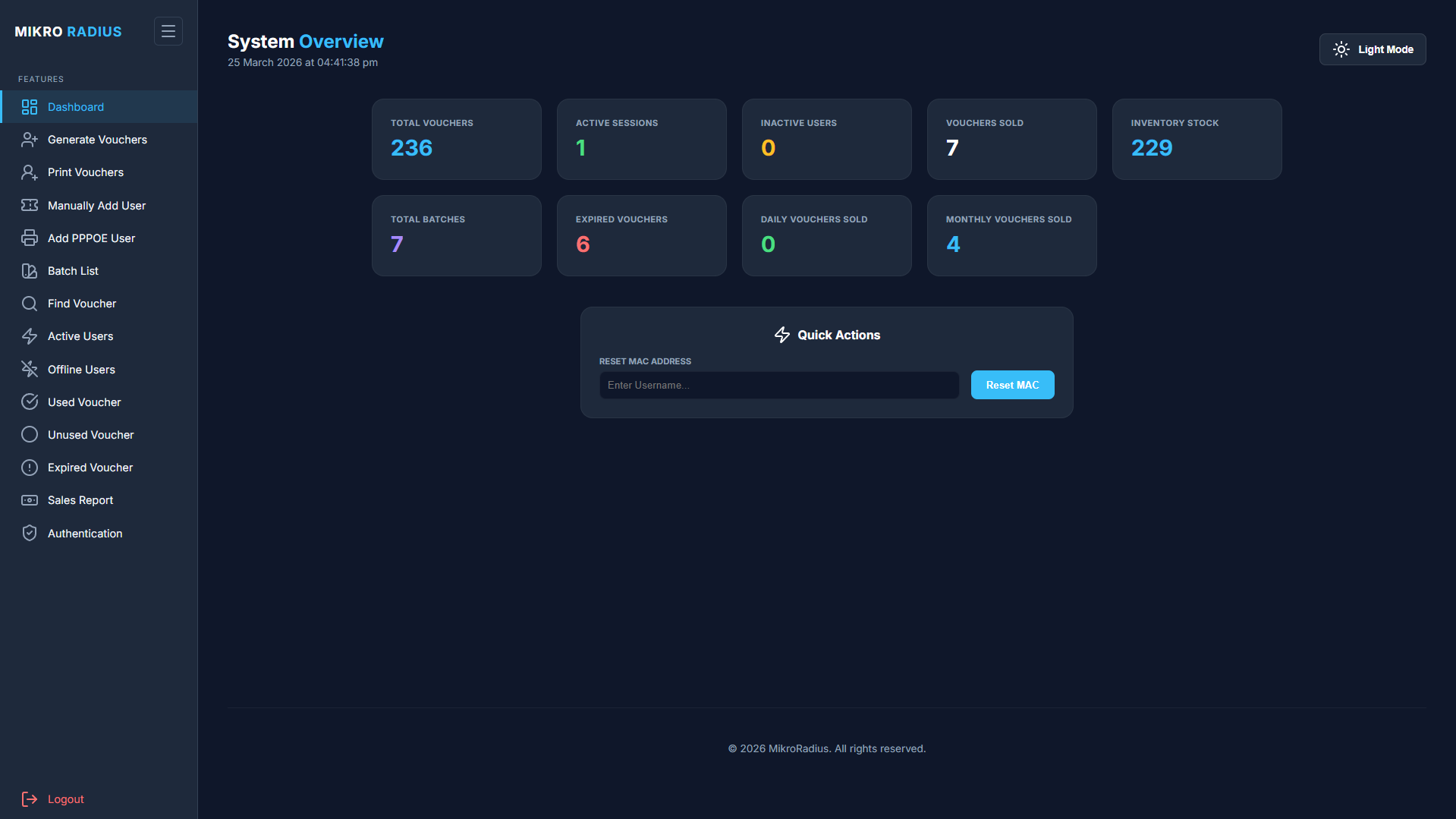
Everything at a glance.

Stop guessing. See your entire network status, daily revenue, and active user count in one unified dashboard. Real-time data visualization helps you make decisions faster.

Live Revenue Tracking
Router Monitoring
Explore Analytics →
Live Revenue Tracking & Router Monitoring

Generate vouchers instantly.

Create thousands of unique hotspot vouchers with a single click. Customize bandwidth limits, time duration, and pricing. Full support for MAC binding and custom prefixes.
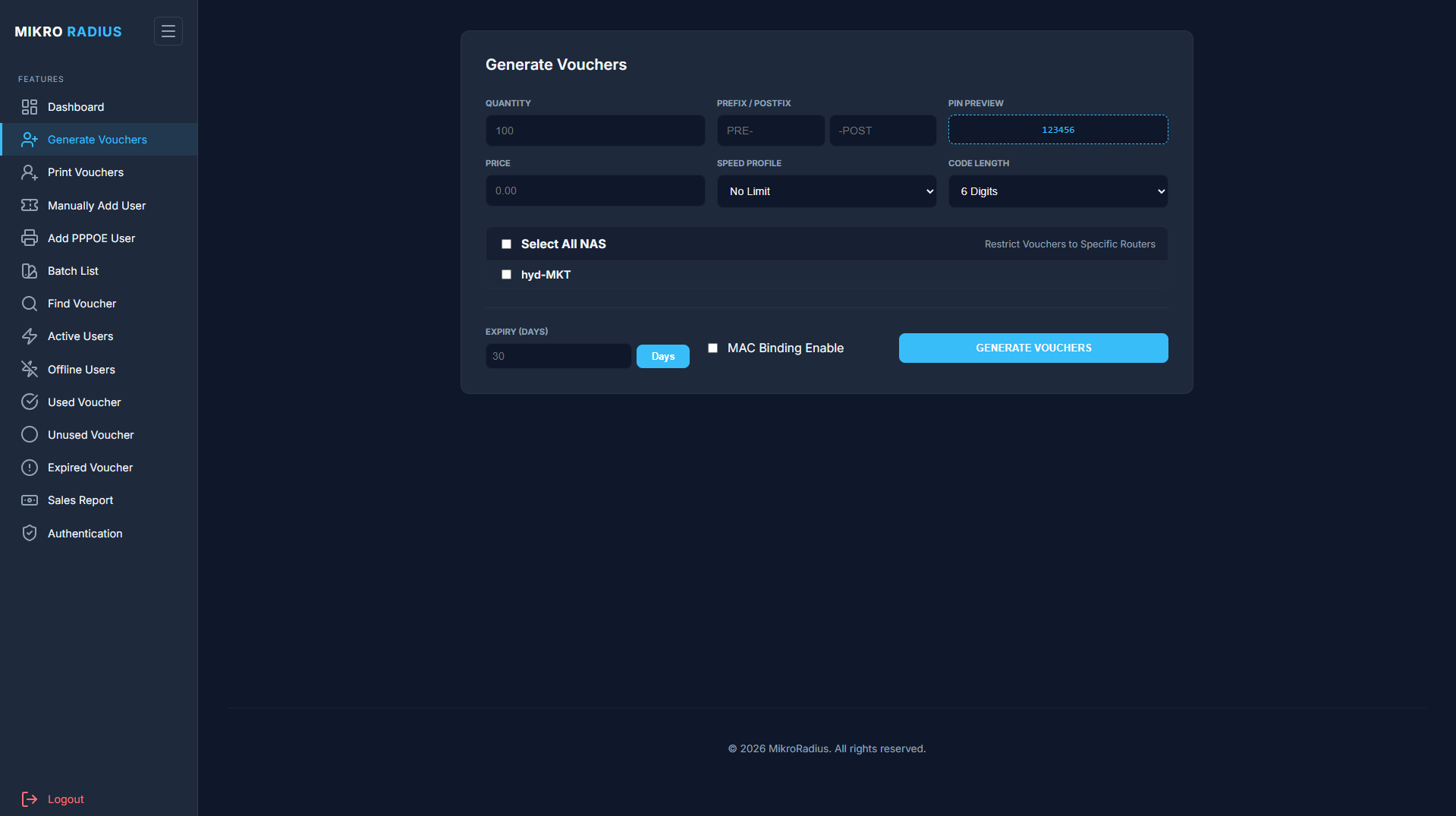
Batch Generation Tool
Speed & Data Plans
Create Free Batch →
Batch Voucher Generator

Total network authority.

View every connected device in real-time. Filter by IP, MAC address, or Username. Identify heavy bandwidth users and disconnect them instantly with one click.
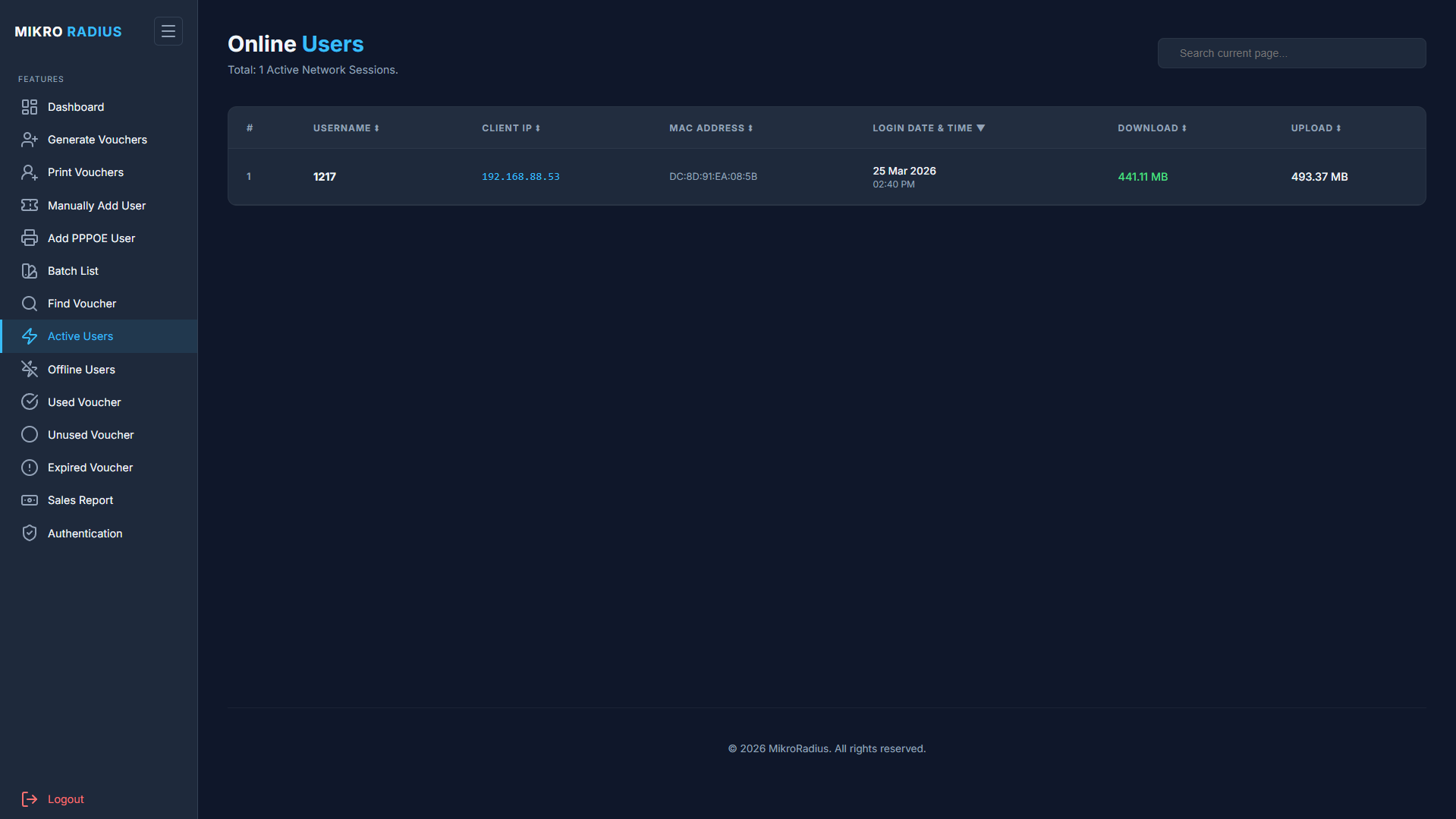
One-Click Remote Disconnect
Live Data Usage Stats
Explore User Controls →
Live Sessions & One-Click Kick

Track every single voucher.

Never lose track of your inventory. The Voucher Registry allows you to search, filter, and manage millions of codes. Check expiration dates, online status, and binding details instantly.

Status Monitoring (Online/Offline)
Device Unlock & MAC Reset
Open Registry →
Voucher Registry Inventory

Professional print-ready designs.

Why use Photoshop? MikroRadius generates beautiful, scan-ready vouchers automatically. Include QR codes for instant login, custom branding, and instructions directly on the card.
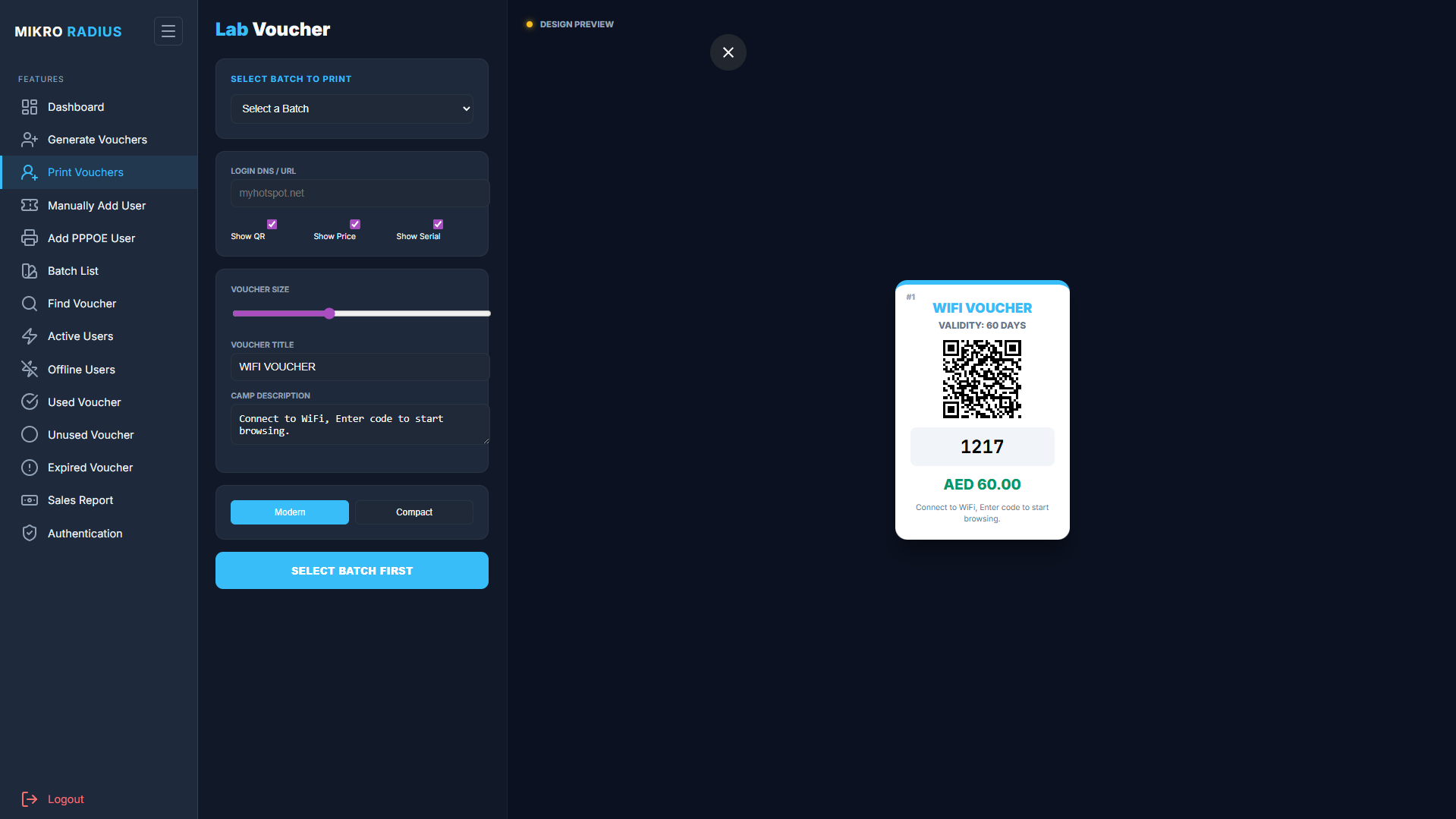
QR Code Login Support
Modern & Compact Layouts
Try Print Layouts →
Voucher Print Studio

Analyze your growth.

Detailed sales reports help you understand your network's performance. Filter by batch, router location, or date range. Export data to CSV, Excel, or PDF for accounting.
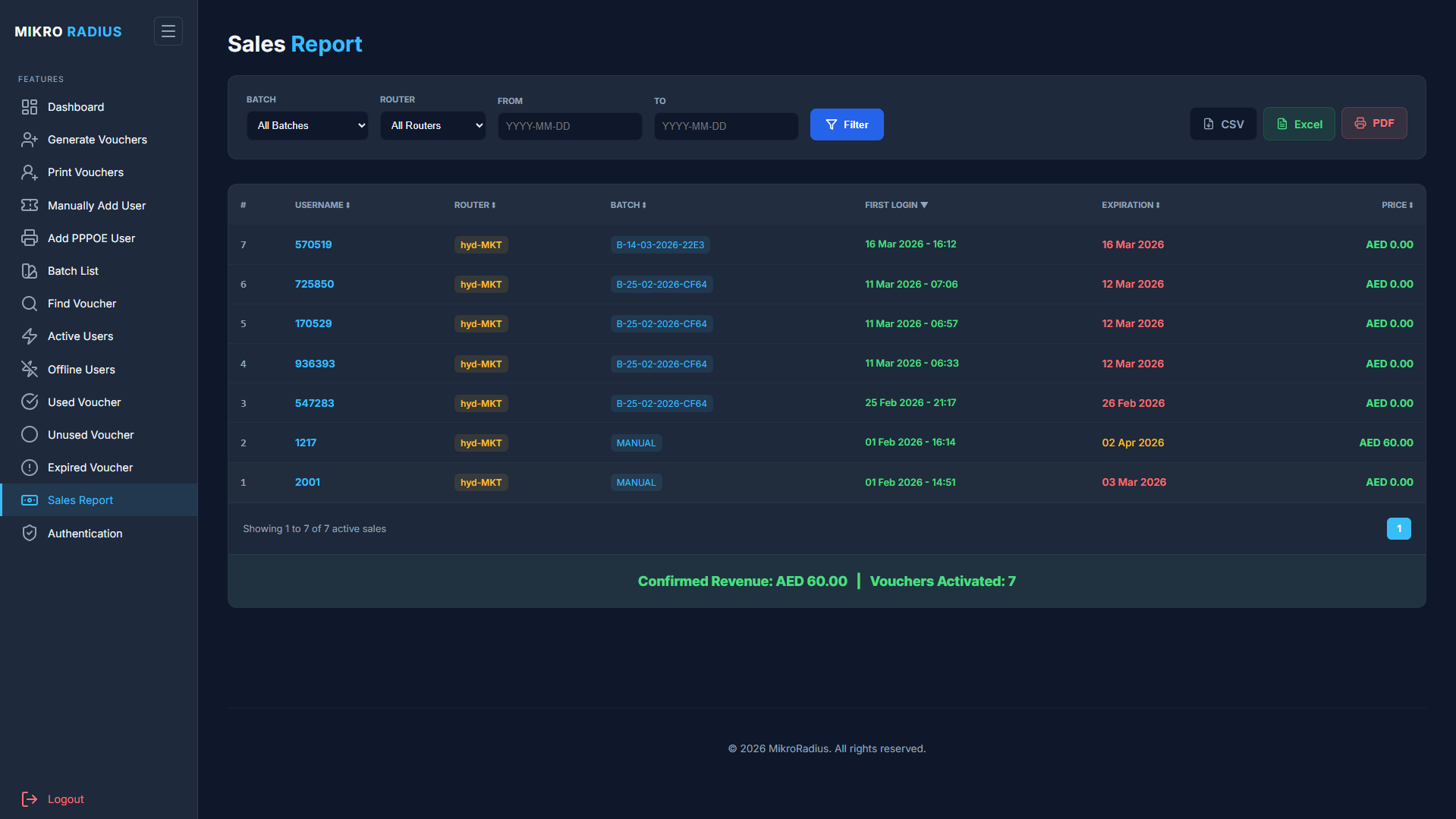
One-Click Export (PDF/Excel/CSV)
Detailed Usage Logs
View Report Specs →
Sales Reports & Accounting Ledger

Command your hotspot network from one screen.

Monitor real-time network throughput, active customer sessions, and voucher performance with sub-second responsiveness.

mikroradius.com/admin/dashboard
Dashboard Preview Vouchers Preview Sessions Preview Registry Preview Print Preview Sales Preview

Up and running in 3 simple steps.

Cloud-powered network management — zero complex scripts, local servers, or manual setup.

STEP 01

Connect Your Router

Connect your router in seconds using standard settings. Customer logins, bandwidth limits, and live usage tracking work right away in the cloud.

STEP 02

Define Rate Profiles

Set up bandwidth speed limits, data quotas, validity periods, and custom pricing per voucher package.

STEP 03

Sell & Monitor Live

Distribute printed tickets or enable guest logins while monitoring active sessions and incoming cash flow in real-time.

Simplifying Complex Networks Worldwide

We are on a mission to simplify wireless and ISP network operations. By pairing RFC-compliant cloud RADIUS authentication with automated voucher generation and live session telemetry, we empower operators to scale reliable guest networks without hardware restrictions or vendor lock-in.

Our Mission

To make enterprise-grade cloud RADIUS authentication, guest invoicing, and user monitoring accessible to WISPs and hotspot operators worldwide.

Automation First

Automate thermal voucher printing, hotspot user renewals, MAC binding, and accounting notices without lifting a finger.

Secure & Reliable

Engineered with multi-layer rate limiting, CSRF protection, and automated security audits to keep hotspot user records secure.

Scale Boundlessly

Whether you manage 10 clients or 10,000 active sessions, our optimized database engine supports seamless scaling.

Engineered for Predictable Operations

Managing high-performing hotspot networks and PPPoE pools shouldn't require decades of systems administration experience. That conviction is what built MikroRadius.

We designed a web console that handles standard RADIUS operations under the hood, leaving admins with a clear, modern dashboard to connect routers, manage voucher rates, track invoices, and verify user connections in real time.

Simple, Transparent Pricing

Start 100% free with 25 concurrent users (Hotspot only), or upgrade to 1,000 active users per router with high-throughput cloud RADIUS.

Don't have a static IP? Connect routers behind Dynamic IP or CGNAT via L2TP Cloud VPN ($5 USD / month).

Free Starter

Zero cost • No credit card required

$0 / forever
Free Tier • $0.00 / mo
  • 1 Connected Router / NAS
  • 25 Concurrent Active Users
  • Hotspot Users Only (No PPPoE)
  • Unlimited Hotspot Vouchers
  • POS Voucher Print Studio
  • Live Session Telemetry & CoA
  • Static IP required (No VPN)

Monthly Pass

Flexible month-to-month billing

$79 / month
Standard Rate • $79.00 / mo
  • 1 Connected Router / NAS
  • 1,000 Concurrent Hotspot Users
  • 50 Concurrent PPPoE Users
  • Unlimited Hotspot Vouchers
  • Bulk Voucher Print Studio
  • Live Session Telemetry & CoA
  • L2TP Cloud VPN (+$5/mo)

Annual Pass

Save 20% with annual commitment

$760 / year
20% Discount • $63.33 / mo
  • 1 Connected Router / NAS
  • 1,000 Concurrent Hotspot Users
  • 50 Concurrent PPPoE Users
  • Unlimited Hotspot Vouchers
  • 20% Discount ($188 Savings)
  • 24/7 Dedicated Support
  • L2TP Cloud VPN (+$5/mo)
Payments fulfilled by Lemon Squeezy (Merchant of Record)
PCI-DSS Level 1 Encrypted Checkout

Compare Plan Capabilities

Comprehensive feature breakdown across billing options. Each subscription covers 1 router & 1,000 active users.

Swipe horizontally to compare all plans
Specifications
Plan Capabilities
Compare billing tiers
Free Forever
Free Starter
$0.00 • 50 Users
Standard
Monthly Pass
$79 / mo
Save 20%
Annual Pass
$760 / yr
Core Capacity & Device Limits
Connected Routers & NAS Gateways 1 Router 1 Router per sub
Concurrent Active Hotspot Users 25 Users 1,000 Users
PPPoE Subscriber Management 1 User Included 50 Users
Vouchers Generated Unlimited Unlimited
Fleet Scaling Upgrade to Paid Add subscriptions
Network Connectivity & L2TP VPN
Cloud L2TP VPN Tunnel Direct Public IP Only +$5 / month
Dynamic & CGNAT IP Support Requires Static IP Supported via L2TP
Commercials & Savings
Billing Frequency Forever Free Monthly
Term Discount — Standard Rate
Total Amount Billed $0 USD $79 USD
Effective Monthly Rate $0.00 / mo $79.00 / mo
Platform & Hotspot Operations
Bulk Voucher Print Studio & Barcodes
Live Session Tracking & Remote Disconnect
Universal Router Authentication & Accounting (RFC 2865, RFC 2866)
Reseller & User Sub-Accounts —
Sales & Financial CSV Reporting
Support SLA Community Standard Community
Choose Plan
Instant activation
Start Free Select Monthly

Loved by network engineers globally.

Read our latest tutorials, release notes, and community guides for scaling MikroTik & RADIUS operations. Click any card to read the full guide.

GUIDE

MikroTik ISP Network Design: IP Planning, Topology, Redundancy & Scaling (2026)

Before you buy hardware or write a single config, you need a network design. This guide covers IP addressing schemes, topology planning for FTTH/wireless ISPs, hardware selection, redundancy strategies, addressing CGNAT vs. public IP, and scaling from 50 to 10,000 subscribers.

TUTORIAL

MikroTik EoIP & VPLS Tunnels: Layer 2 VPN Over the Internet

Need to extend a VLAN or broadcast domain across the internet? EoIP and VPLS let you bridge two or more remote sites at Layer 2 – making distant networks behave as one. This guide covers both protocols with step‑by‑step setup, IPsec encryption, and VPLS for multi‑site deployments.

TUTORIAL

MikroTik Queue Tree & HTB: Advanced Traffic Shaping (Beyond Simple Queues)

Simple Queues are great for basic speed limits, but Queue Trees give you hierarchical, granular control – guaranteed bandwidth, burst, priority, and per‑protocol shaping. This guide covers HTB, mangle marking, parent/child queues, and real‑world ISP examples.

TUTORIAL

MikroTik DHCP Server Advanced: Option 82, Static Leases & Relay (2026)

Go beyond basic DHCP. Learn about DHCP relay, Option 82 (circuit‑ID), static leasing, custom options (PXE, TFTP), and per‑client DNS assignments – all on MikroTik RouterOS.

TUTORIAL

MikroTik LTE Setup Guide: Primary & Failover Internet (2026)

Add LTE/4G/5G connectivity to your MikroTik router for backup or primary internet. This guide covers modem configuration, passthrough mode, failover with recursive routing, and monitoring.

TUTORIAL

ZeroTier on MikroTik: Easy VPN Without Public IPs (Full Setup Guide)

No public IP? No problem. ZeroTier creates secure, software-defined networks that work behind NAT, firewalls, and dynamic IPs. This guide shows you how to install ZeroTier on RouterOS v7 and connect remote sites or devices effortlessly.

TUTORIAL

MikroTik WireGuard Performance Tuning & Optimization (2026 Deep Dive)

Is your MikroTik WireGuard VPN slower than expected? This guide covers advanced optimization techniques: MSS clamping, CAKE queue discipline, FastTrack tuning, CPU affinity, and real-world benchmarking. Squeeze every megabit from your WireGuard tunnels.

TUTORIAL

CAPsMAN Setup Guide: Centralize Your MikroTik WiFi Network (2026)

Managing multiple MikroTik access points one by one is tedious. CAPsMAN turns your router into a central WiFi controller – push one configuration to all APs, enable roaming, and monitor clients from a single dashboard.

TUTORIAL

How to Set Up Site-to-Site IPsec VPN on MikroTik (Connect Two Offices Securely)

Need to connect two office networks as if they were one? This guide walks you through configuring an IKEv2 IPsec site‑to‑site VPN between two MikroTik routers – with NAT traversal, perfect forward secrecy, and troubleshooting tips.

TUTORIAL

MikroTik Firewall Basics: Protect Your Router from Attacks

Your MikroTik router is exposed to the internet 24/7. This guide teaches you essential firewall rules – drop invalid packets, block port scanners, allow only necessary services, and protect your LAN from intruders.

TUTORIAL

How to Set Up WireGuard VPN on MikroTik Router (Fast & Secure)

WireGuard is the fastest, most secure VPN protocol for MikroTik RouterOS v7. This step‑by‑step guide shows how to create a server, client configs, and connect from Windows, macOS, Linux, Android, and iOS.

NETWORKING

Why We Built MikroRadius (And Why Your Hotspot Management Probably Needs It)

Managing a MikroTik hotspot manually is a pain. Vouchers, PPPoE users, bandwidth limits – it’s overwhelming. Here’s why we built MikroRadius to automate it all.

TUTORIAL

MikroTik Bandwidth Test, Torch & Speed Test: Measure and Diagnose Network Speed

How fast is your link REALLY? MikroTik has built-in tools to measure throughput between routers, monitor per-IP bandwidth in real-time, and test internet speed – no external tools needed. This guide covers bandwidth-test, Torch, Traffic Monitor, Speed Test, and profile for CPU analysis.

TUTORIAL

MikroTik OSPF Setup: Dynamic Routing for Multi‑Router Networks (2026 Guide)

Stop manually adding static routes on every router. OSPF automatically discovers, calculates, and updates the best paths across your entire network. This step‑by‑step guide covers RouterOS v7 OSPF syntax, areas, interface templates, route redistribution, authentication, multi‑area design, and running OSPF over VPN tunnels – with CLI commands and WinBox paths for every step.

TUTORIAL

How to Configure DNS and DoH (DNS over HTTPS) on MikroTik Router

DNS is the backbone of every internet connection – and it's often the weakest link in your privacy chain. This guide shows you how to set up MikroTik as a local DNS server, configure upstream resolvers, enable DNS over HTTPS (DoH) on RouterOS v7, block DNS bypass attempts, and even use DNS for basic ad blocking.

TUTORIAL

MikroTik Bonding: Link Aggregation & LACP Setup (2026)

Combine multiple Ethernet links for higher throughput and failover. Learn bonding modes (802.3ad LACP, active‑backup, balance‑xor), configuration steps, and best practices for MikroTik RouterOS.

TUTORIAL

BGP on MikroTik: Beginner's Guide to Internet Edge Routing (2026)

Connect your network to the internet with full BGP control. Learn BGP basics, eBGP setup with upstream providers, prefix filtering, and route selection – all on MikroTik RouterOS.

TUTORIAL

MikroTik Scheduler & Scripting: Automate Your Network (2026 Guide)

Stop performing repetitive tasks manually. Learn how to use MikroTik's built‑in scheduler and scripting language to automate backups, bandwidth changes, firewall updates, and email alerts – with ready‑to‑use examples.

TUTORIAL

WireGuard with VLAN Tagging on MikroTik: Segment VPN Users Like a Pro

Need to place remote WireGuard VPN users into specific VLANs (Guest, Staff, IoT)? This guide shows how to combine WireGuard with bridge VLAN filtering and RADIUS attributes – giving you granular control over VPN traffic segmentation.

TUTORIAL

WireGuard Hub-and-Spoke VPN on MikroTik: Central Office with Multiple Branches

Need to connect three or more branch offices to a central headquarters? This tutorial shows how to build a scalable hub‑and‑spoke WireGuard VPN on MikroTik – central router as hub, branches as spokes, with routing, NAT bypass, and traffic isolation.

TUTORIAL

How to Set Up Bandwidth Management Using Simple Queues on MikroTik

Need to limit internet speed for specific devices or users? MikroTik Simple Queues give you granular control – from per‑IP limits to guaranteed minimum bandwidth. This guide covers queue basics, PCQ, burst, and real‑world examples.

TUTORIAL

How to Set Up a PPPoE Server on MikroTik (ISP & Multi‑Tenant Networks)

PPPoE is the standard for ISP and apartment network authentication. This guide shows you how to create a PPPoE server on MikroTik – including IP pools, secrets, bandwidth limits, and RADIUS integration for billing.

TUTORIAL

How to Set Up a PPTP Server on MikroTik Router (And Why You Should Think Twice)

PPTP is the fastest VPN to configure on MikroTik, but it's dangerously insecure. This guide shows every CLI and WinBox step – and explains when (if ever) you should still use it. For production, use WireGuard.

TUTORIAL

MikroTik RouterOS Scripting Deep Dive: Variables, Loops, Functions & Error Handling

RouterOS scripting is more powerful than most admins realize. Beyond simple one-liners, you can write full programs with variables, loops, arrays, functions, error handling, and HTTP fetch. This deep dive covers the scripting language from basics to advanced automation patterns.

TUTORIAL

MikroTik Port Forwarding & NAT Guide: Host Servers Behind Your Router

Learn how to forward ports on MikroTik using dst-nat rules – host web servers, game servers, IP cameras, and more behind your router. Covers hairpin NAT, 1:1 NAT with netmap, multiple public IPs, security best practices, and complete copy-paste scripts.

TUTORIAL

How to Set Up L2TP/IPsec VPN on MikroTik Router (Built‑in Client Support, No App Needed)

L2TP/IPsec is the only VPN protocol with native client support on Windows, macOS, iOS, Android, and Linux – no third‑party app required. This step‑by‑step guide covers full server setup on MikroTik, IPsec encryption, client configuration for every OS, and RADIUS integration.

TUTORIAL

The Dude on MikroTik: Network Monitoring & Mapping Guide (2026)

Monitor your entire network from a single dashboard. Learn how to install The Dude, auto‑discover devices, set up alerts, and create network maps – all on MikroTik RouterOS.

TUTORIAL

Running Containers on MikroTik RouterOS v7: Pi‑hole, Unbound & More

Turn your MikroTik router into an application server. Learn how to run Linux containers (Pi‑hole, AdGuard Home, Unbound) directly on RouterOS v7 – with storage setup, network configuration, and real‑world examples.

TUTORIAL

Dual-WAN Load Balancing & Failover on MikroTik (PCC + Recursive Routing)

Combine two internet connections for higher speed and automatic failover. This guide covers PCC load balancing, recursive routing for reliable WAN detection, and firewall rules – all on MikroTik RouterOS.

TUTORIAL

WireGuard + OSPF on MikroTik: Dynamic Routing for Scalable VPN Networks

Static routes don't scale. Combine WireGuard with OSPF to automatically exchange routes between sites, handle link failures, and build resilient multi‑site VPNs. This advanced guide covers OSPF over WireGuard tunnels on MikroTik RouterOS.

TUTORIAL

Site-to-Site WireGuard VPN on MikroTik: Connect Two Offices Securely (2026 Guide)

Need to link two office networks as if they were one? This tutorial shows how to build a fast, secure site‑to‑site WireGuard VPN between two MikroTik routers – including routing, firewall, NAT bypass, and OSPF integration.

TUTORIAL

How to Configure VLANs on MikroTik Router (Network Segmentation Made Easy)

VLANs let you split one physical network into multiple isolated networks – perfect for separating guests, IoT devices, or corporate traffic. This step‑by‑step guide covers VLAN creation, trunk ports, access ports, and inter‑VLAN routing on MikroTik RouterOS.

TUTORIAL

How to Set Up a Hotspot on MikroTik Router (Guest WiFi with Login Page)

Turn your MikroTik router into a professional hotspot with captive portal. This guide covers basic setup, user accounts, vouchers, bandwidth limiting, and RADIUS integration – perfect for cafes, offices, and public WiFi.

TUTORIAL

How to Set Up a MikroTik Router from Scratch: A Complete Beginner's Guide (2026)

New to MikroTik? This step‑by‑step tutorial covers WinBox, basic security, LAN/WAN, DHCP, NAT, and a simple firewall – get a safe, working router in under 20 minutes. Perfect foundation for any advanced setup.

Talk to MikroRadius.

Have a question about volume pricing, custom network setups, or need technical support? Drop us a message and our engineering team will get back to you shortly.

Enterprise response SLA • Direct Senior Engineers

Send a Message